
Copying Prices From Another Job in SharpeSoft Estimator
How to
When copying bid items, especially between jobs, it's important to remember there are options present within Estimator for registering any changes between prices.
This article concerns specifically the option Prompt to keep existing item detail costs during item copy.
This is done from the Options tab within the Preferences window. It's located within the Defaults menu on the toolbar.

In practice, If the box is NOT checked and you copy an item from another job, the system automatically pulls in the most current prices. When the box is checked, the system will ask if you want to refresh the prices before pulling in the most current prices.
Items copied within the same job are never refreshed. To refresh prices within the same job, you must go to the applicable tables or the Utilities menu to recalculate the job.
Example
In our original job, we have a bid item called Clearing & Grubbing with the current price listed below:

Using our keyboard or right-clicking, we now copy the bid item as it is.
Later, while the job is still in our clipboard, the the bid item is updated to the new price below:

If we were to then paste the bid item into another job while we have the Prompt to keep existing item detail costs during item copy box checked, we would be presented with the following prompt:
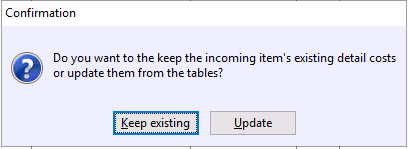
If not, then the item will come into the new job with the second price shown above.
Remember to recalculate the job using the Utilities menu whenever you are copying bid items between jobs.
Conclusion
Getting started with SharpeSoft is a breeze. Whether you are looking to create a new job or add one, SharpeSoft has got your back. We have the tools and expertise necessary to help you make it happen without breaking a sweat.
You can continue on to other helpful Fast Trax articles found in the Blog section. To learn more about this particular subject, consult your system Help manual, or just give us a call and we’ll be glad to walk you through it.

Comments