
Job Owner, Job Default, and Company Default Tax Rates in SharpeSoft Estimator
Determining and applying a proper tax rate is an imperative aspect of running a business. The SharpeSoft Estimator offers multiple different methods by which to determine an appropriate tax rate based on different default criteria. These are tax rates based on Job Owner, a Job Default, or a Company Default.
Job Owner Tax Rate
As the name implies, the Job Owner Tax Rate is a tax rate associated with a specific owner of a job. Owners are first entered in the Owners table, along with important details such as the owner's tax rate. This rate will be applied to all jobs created under this owner going forward, however the tax rate of the job itself and the owner can be updated at any time.
How to:
Click on Tables in the main toolbar.
Select Owners from the dropdown menu.
In the Owners/Agencies window, create or edit existing owners. Double click on the owner to open the Update Owner Details window, where you can enter your owner's tax rate.
Another benefit of using Job Owner tax rates is that SharpeSoft allows users to assign default Labor and Equipment Areas as well.

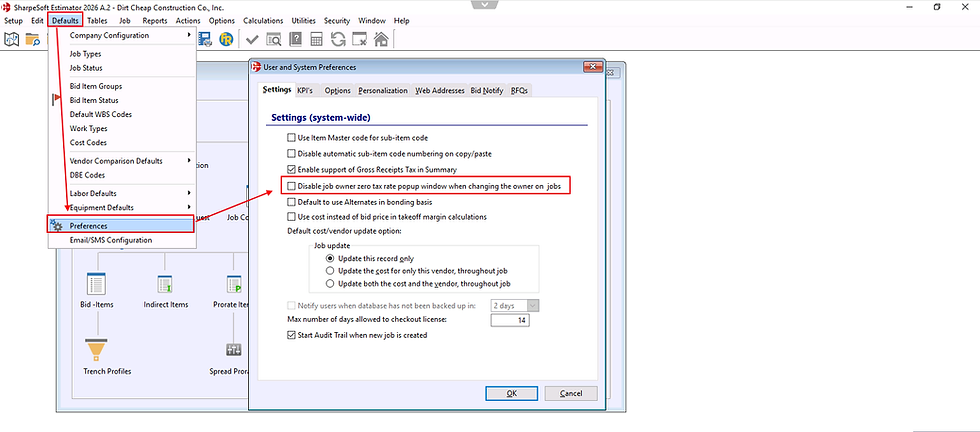
A popup will always appear when changing between different job owners, even if they have the same tax rate. However, if an owner has a tax rate of 0, there is an option in the Preferences window to disable the popup for these occurrences only.
Job Default Tax Rate
The Job Default Tax Rate is used only to override a Job Owner default tax rate, as the Owner rate takes precedence over others, unless there is none specified. For example, using the screenshot above, the Job Default Tax Rate would match the Owner Tax rate of 10%. Changing the Job Default Tax Rate would update the rate only for the currently activated job.
How to:
Click on Jobs in the main toolbar.
Select Job Information & Settings from the dropdown menu.
Select Job Default Tax Rate. Update the rate to whatever is appropriate.

Company Default Tax Rate
The Company Default Tax Rate is the rate associated with the company created in the Company & Offices window that will also take precedence when creating a new job if no owner is selected.
How to:
Click on the Defaults Menu in the main toolbar.
Select Company Configuration.
Select Default Sales Tax Rate.

Conclusion
Getting started with SharpeSoft is a breeze. Whether you are looking to create a new job or add one, SharpeSoft has got your back. We have the tools and expertise necessary to help you make it happen without breaking a sweat.
You can continue on to other helpful Fast Trax articles found in the Blog section. To learn more about this particular subject, consult your system Help manual, or just give us a call and we’ll be glad to walk you through it.


Comments